
User Guide




5-124 190-00649-00 Rev. A
Garmin G1000 Pilot’s Guide for the Diamond DA42
GPS NAVIGATION
Selecting a Stormscope lightning symbol zoom range:
1) With the ‘Weather’ Group displayed, select ‘STRMSCP SMBL’.
2) Select the desired range.
3) Press the
ENT
Key.
4) Press the
FMS
Knob to return to the Navigation Map Page.
XM Weather (Optional)
WARNING: XM Weather is not intended to be used for hazardous weather penetration. Weather information
provided by XM Radio Service is approved only for weather avoidance, not penetration.
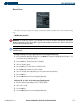
• NEXRAD DATA - Turns the display of NEXRAD data and radar coverage on or off and selects the desired
display range.
• XM LTNG - Turns the display of XM Lightning on or off and selects the desired display range.
• CELL MOVEMENT - Turns the display of storm cell movement on or off. The Cell Movement option is
only shown when NEXRAD is turned on.
Enabling/disabling NEXRAD data on the Navigation Map Page:
1) With the ‘Weather’ Group displayed, select ‘XM LTNG’.
2) Select ‘On’ (display NEXRAD data) or ‘Off’ (remove NEXRAD data).
3) Press the
ENT
Key.
4) Press the
FMS
Knob to return to the Navigation Map Page.
Selecting a NEXRAD zoom range:
1) With the ‘Weather’ Group displayed, select the ‘NEXRAD DATA’ range field.
2) Select the desired range.
3) Press the
ENT
Key.
4) Press the
FMS
Knob to return to the Navigation Map Page.