
User Guide




5-122 190-00649-00 Rev. A
Garmin G1000 Pilot’s Guide for the Diamond DA42
GPS NAVIGATION
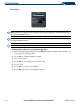
Enabling/disabling the fuel range ring and select a fuel range time:
1) Press the
MENU
Key with the Navigation Map Page displayed. The cursor flashes on the ‘Map Setup’ option.
2) Press the
ENT
Key. The Map Setup Menu is displayed.
3) Select the ‘Map’ group.
4) Press the
ENT
Key.
5) Highlight the ‘FUEL RNG (RSV)’ field.
6) Select ‘On’ or ‘Off’.
7) Highlight the fuel reserve time field. The time indicated is the time the aircraft can fly with remaining fuel on
board.
8) To change the reserve fuel time, enter a time (00:00 to 23:59; hours:minutes). The default setting is 00:45
minutes.
9) Press the
ENT
Key.
10) Press the
FMS
Knob
to return to the Navigation Map Page.