
User Guide




5-117190-00649-00 Rev. A
Garmin G1000 Pilot’s Guide for the Diamond DA42
GPS NAVIGATION
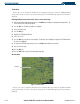
Track Vector
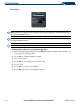
Figure 5-81 Track Vector
Track Vector
The Navigation Map can display a track vector as a dashed cyan line segment with an arrowhead
attached to the end, extended to a predicted location in 60 seconds along the current aircraft track. The
track vector is useful in minimizing track angle error.
Enabling/disabling the track vector:
1) Press the
MENU
Key with the Navigation Map Page displayed. The cursor flashes on the ‘Map Setup’ option.
2) Press the
ENT
Key. The Map Setup Menu is displayed.
3) Select the ‘Map’ group.
4) Press the
ENT
Key.
5) Highlight the ‘TRACK VECTOR’ field.
6) Select ‘On’ or ‘Off’.
7) Press the
FMS
Knob
to return to the Navigation Map Page.