
User Guide



5-112 190-00649-00 Rev. A
Garmin G1000 Pilot’s Guide for the Diamond DA42
GPS NAVIGATION
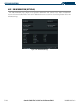
VNAV MENU OPERATIONS
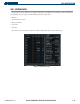
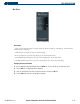
The VNAV messages are not enabled until the ‘VNAV Messages On?’ option is enabled from the VNAV Page
Menu (Figure 5-77). To display the page menu, press the
MENU
Key (with the VNAV Page displayed). The
VNAV Page Options Menu also allows the pilot to restore VNAV page defaults.
Figure 5-77 Vertical Navigation Window Menu
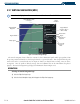
OTHER VNAV OPERATIONS
To display map data on the Vertical Navigation Map Page, press the
MAP
Softkey. Press the
TOPO
,
TERRAIN
,
or
LTNG
Softkey. Press the same Softkey to remove the displayed data from the Vertical Navigation Page.