
User Guide





5-106 190-00649-00 Rev. A
Garmin G1000 Pilot’s Guide for the Diamond DA42
GPS NAVIGATION
Predicting RAIM availability:
1) Select the GPS Status Page.
2) Press the
FMS
Knob
.
3) Select the ‘WAYPOINT’ Page.
4) Turn the
small FMS
Knob to display the Waypoint Information Page.
5) Enter the desired waypoint.
6) Press the
ENT
Key to accept.
7) Enter an arrival time.
8) Press the
ENT
Key.
9) Enter an arrival date. The cursor highlights the ‘COMPUTE RAIM’ field.
10) Press the
ENT
Key to compute RAIM. The following options are displayed:
• ‘COMPUTE RAIM?’ if RAIM has not been computed for the current waypoint, time, and date combination
• ‘COMPUTING AVAILABILITY’ if the RAIM calculation is in progress
• ‘RAIM AVAILABLE’ if RAIM is predicted to be available for the given combination of waypoint, time, and date
• ‘RAIM NOT AVAILABLE’ if RAIM is predicted to be unavailable for the given combination of waypoint, time, and
date
NOTE: RAIM computations predict satellite coverage within +/- 15 minutes of the specified arrival date and
time.
GPS SIGNAL STRENGTH
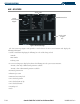
The GPS Status Page can be helpful in troubleshooting weak (or missing) signal levels due to poor
satellite coverage or installation problems. As the GPS receiver locks onto satellites, a signal strength bar
is displayed for each satellite in view, with the appropriate satellite number (01-32) below each bar. The
progress of satellite acquisition is shown in three stages:
• No signal strength bars - the receiver is looking for the satellites indicated
• Hollow signal strength bars - the receiver has found the satellites and is collecting data
• Solid signal strength bars - the receiver has collected the necessary data and the satellites are ready for
use
• Checkered signal strength bars - the receiver has excluded the satellite (Fault Detection and Exclusion)
Selecting the GPS receiver for which data is displayed:
1) Select the GPS Status Page.
2) Press the
GPS1
Softkey for the display of information pertaining to GPS1 or press the
GPS2
Softkey for the
display of information pertaining to GPS2.