
User Guide




190-00649-00 Rev. A
Garmin G1000 Pilot’s Guide for the Diamond DA42
1-13
SYSTEM OVERVIEW
1.6 G1000 CONTROLS
The G1000 controls have been designed to simplify operation of the system and minimize workload and the
time required to access sophisticated functionality. Controls are located on the PFD, MFD, and Audio Panel. PFD
and MFD controls and softkeys are discussed in this section. Audio Panel controls are described in the Audio
Panel and CNS Section. See the Audio Panel and CNS Section for more information about NAV/COM controls.
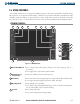
PFD/MFD CONTROLS
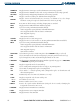
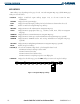
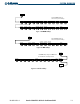
Figure 1-11 PFD/MFD Controls
17
18
5
6
8
7
2
4
3
1
9
15
14
13
12
16
11
10
1
NAV VOL/ID Knob
Turn to control NAV audio volume (shown in the NAV Frequency Box as a
percentage)
Press to toggle Morse code identifier audio ON/OFF
2
NAV Frequency
Transfer Key
Transfers the standby and active NAV frequencies
3
NAV Knob
Turn to tune NAV receiver standby frequencies (large knob for MHz; small for kHz)
Press to toggle tuning box (light blue) between NAV1 and NAV2
4
Heading Knob
Turn to manually select a heading
Press to display a digital heading momentarily to the left of the HSI and synchronize
the Selected Heading to the and current heading
5
Joystick
Turn to change map range
Press to activate Map Pointer for map panning