
User Guide





5-100 190-00649-00 Rev. A
Garmin G1000 Pilot’s Guide for the Diamond DA42
GPS NAVIGATION
Flight Plan
Number
Flight Plan Leg
Number
‘To’
Waypoint
‘From’
Waypoint
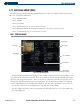
Figure 5-66 Flight Plan Mode
Performing automatic waypoint fuel planning operations:
1) The current page mode is displayed at the top of the page, ‘AUTOMATIC’ or ‘MANUAL’. Press the
AUTO
Softkey.
2) For direct-to fuel planning, press the
WPTS
Softkey and enter the flight plan departure airport (FROM) in the
waypoint field (P.POS; present position) (Figure 5-66).
3) Press the
ENT
Key and the flashing cursor moves to the ‘to’ waypoint field (Figure 5-67).
4) Enter the identifier of the ‘to’ waypoint and press the
ENT
Key to accept the waypoint.
Once the ‘to’ waypoint is entered, fuel statistics for the direct-to are displayed, no manual input of data is
required.
Figure 5-67 Waypoint Mode
Flight Plan Field
Not Accesible
For fuel planning using a stored flight plan instead of direct-to waypoints, follow the steps previously given
for waypoint fuel planning except enter a desired flight plan number and/or a desired leg of the flight plan
instead of waypoints (Figure 5-68).
Figure 5-68 Flight Plan and Leg Number Fields