
User Guide





5-99190-00649-00 Rev. A
Garmin G1000 Pilot’s Guide for the Diamond DA42
GPS NAVIGATION
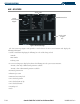
• TOTAL RANGE (total range at entered fuel flow) - this value is calculated by multiplying the time of fuel
endurance by the ground speed.
OTHER STATS
• DENSITY ALT (density altitude)
• TRUE AIRSPEED
• WIND DIRECTION, WIND SPEED, TAIL or HEAD WIND (only in auto mode) - the head wind is shown
as a tail wind value if appropriate.
OPERATIONS
FUEL PLANNING
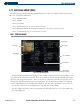
The Trip Planning Page displays current fuel conditions along the active direct-to or flight plan using fuel
flow and/or fuel totalizer data. Fuel flow, ground speed (GS), and fuel on board values can be manually
entered for planning purposes.
Performing manual waypoint fuel planning operations:
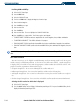
1) Select the Trip Planning Page.
2) The current page mode is displayed at the top of the page, ‘AUTOMATIC’ or ‘MANUAL’. Press the
MANUAL
Softkey.
3) For direct-to fuel planning, press the
WPTS
Softkey and enter the flight plan departure airport (FROM) in the
waypoint field (P.POS; present position).
4) Press the
ENT
Key and the flashing cursor moves to the ‘to’ waypoint field.
5) Enter the identifier of the ‘to’ waypoint and press the
ENT
Key to accept the waypoint.
6) Enter the following values:
• DEP TIME (departure time) - this defaults to the current time
• GS - ground speed
• FUEL FLOW
• FUEL ONBOARD
• CALIBRATE AS (calibrated airspeed) - in auto mode, the primary source of information is from the air data
system, and the secondary source of information is the GPS ground speed.
• INDICATED ALTITUDE - In auto mode, the primary source of information is the barometric altitude, and the
secondary source of information is the GPS altitude.
• PRESSURE (barometric pressure)
• TOTAL AIR TEMPERATURE
Once the last value is entered, fuel statistics for the direct-to are displayed.