
User Guide





5-97190-00649-00 Rev. A
Garmin G1000 Pilot’s Guide for the Diamond DA42
GPS NAVIGATION
5.11 AUX PAGE GROUP (MFD)
The Auxiliary Pages provide detailed trip planning information, satellite status, RAIM prediction, system settings,
LRU status, and database information.
• AUX - TRIP PLANNING
• AUX – UTILITY
• AUX - GPS STATUS
• AUX - SYSTEM SETUP (see the System Overview section)
• AUX – XM INFORMATION (if XM product configured; see the System Overview Section)
• AUX - SYSTEM STATUS (see the System Overview section)
AUX - TRIP PLANNING
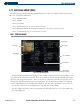
Figure 5-65 Trip Planning Page
Trip Planning
Page Softkeys
Trip Statistics
Other Statistics
Fuel Statistics
Page Mode
Inset Map
Input Data
The Trip Planning Page (Figure 5-65) displays calculated statistics regarding the projected path of flight, based
on a number of input parameters provided. There are two modes of entering the projected flight path, a flight
plan mode and a waypoint entry mode. There are two sources of input data, manually entered by the user, or
automatically updated through input sensors and equipment. The Trip Planning Page displays the following:
• An Inset Map showing the selected flight plan or flight leg. This map has an appropriate scale in order to see
the selection. If there is no selected flight path the map shows the current position.
• The selected flight plan number and selected leg number (in flight plan mode). The selected leg number may
be the entire flight plan.