
User Guide

5-94 190-00649-00 Rev. A
Garmin G1000 Pilot’s Guide for the Diamond DA42
GPS NAVIGATION
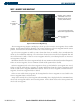
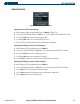
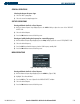
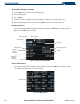
Viewing and quickly loading the frequency for a controlling agency:
1) With the Nearest Airspace Page displayed, press the
MENU
Key.
2) Highlight ‘Select Frequency Window’.
3) Press the
ENT
Key. The cursor is placed in the ‘Frequencies’ window.
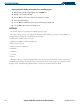
4) Select the desired frequency.
5) Press the
ENT
Key to load the frequency into the COM frequency standby field.
6) Press the
FMS
Knob
to remove the flashing cursor.
AIRSPACES
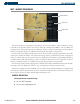
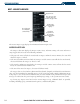
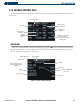
The Nearest Airspaces Page displays the following airspace types:
The Nearest Airspaces Page also displays the floor and ceiling limits of the airspace. The following are
examples of what may appear as vertical limits for an airspace:
• 5,000 ft MSL (5,000 feet mean sea level)
• 5,000 ft AGL (5,000 feet above ground level)
• MSL (at mean sea level)
• Notam (see Notice to Airmen)
• Unknown
• Unlimited
• See Chart
• Surface
All airspace messages, except for prohibited areas, may be turned on or off from the System Setup Page in
the Auxiliary Page Group. An altitude buffer is also provided on the System Setup Page to provide an extra
margin of safety above/below the published limits. Refer to the System Overview for details.