
User Guide

5-92 190-00649-00 Rev. A
Garmin G1000 Pilot’s Guide for the Diamond DA42
GPS NAVIGATION
NRST - NEAREST AIRSPACES
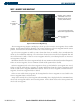
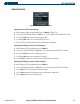
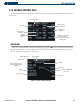
Figure 5-59 Nearest Airspaces Window
Airspace Alerts
Airspace Type
and Controlling
Agency
The Ceiling and
Floor Altitudes
(vertical limits)
Note: At most, three
airspace alerts are
shown at any given time
Associated
Frequencies for
the currently
selected Airspace
Alert
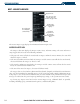
The Nearest Airspaces page displays the information shown in Figure 5-59.
AIRSPACE ALERTS BOX
The Airspace Alerts Box displays the Airspace Name, Status, and Time to Entry. The status and time to
entry (if applicable) are based on the following conditions:
• If the projected course will take the aircraft inside an airspace within the next ten minutes, the status field
shows the airspace as ‘Ahead’.
• If the aircraft is within two nautical miles of an airspace and the current course will take the aircraft inside,
the status field shows the airspace as ‘Ahead < 2 nm’.
• If the aircraft is within two nautical miles of an airspace and the current course will not take the aircraft
inside, the status field shows ‘Within 2 nm’.
• If the aircraft has entered an airspace, the status field shows ‘Inside’.
The airspace alerts are based on three-dimensional data (latitude, longitude, and altitude) to avoid nuisance
alerts. The alert boundaries for controlled airspace are also sectored to provide complete information on any
nearby airspace. Once the described conditions exists, the status and time of entry is shown if the airspace alert
messages are enabled on the System Setup Page (Auxiliary Page Group; see the System Overview Section).
By selecting any airspace name listed on the Nearest Airspaces Page, additional details are provided,
including controlling agency, communication frequencies, and floor/ceiling limits.