
User Guide




5-69
GPS NAVIGATION
190-00649-00 Rev. A
Garmin G1000 Pilot’s Guide for the Diamond DA42
WPT - INTERSECTION INFORMATION
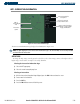
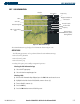
Figure 5-43 Intersection Information Page
Nearest VOR Information;
Identifier, Symbol, Radial
Angle, and Distance
Intersection Identifier
and Symbol
Map of
Surrounding
Area
Intersection
Symbol
Intersection General
Location and Position
The Intersection Information Page displays the information in Figure 5-43:
NOTE: The VOR displayed on the Intersection Information Page is the nearest VOR, not necessarily the VOR
used to define the intersection.
OPERATIONS
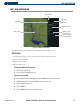
To change the map range, turn the Joystick to the left to select a lower range, turn it to the right to select a
higher range. Intersections can only be selected by identifier.
Selecting the Intersection Information Page:
1) Select the WPT page group.
2) Select the second rectangular page icon.
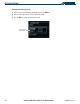
Selecting an Intersection:
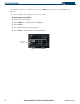
1) With the Intersection Information Page displayed, press the
FMS
Knob
to activate the cursor.
2) Enter a name for the identifier.
3) Press
the
ENT
Key.
4) Press the
FMS
Knob
to remove the flashing cursor.