
User Guide



5-52
GPS NAVIGATION
190-00649-00 Rev. A
Garmin G1000 Pilot’s Guide for the Diamond DA42
ADDITIONAL AIRPORT RUNWAY INFORMATION
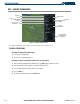
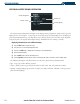
Figure 5-38 Runway Information Field
Runway Surface
Runway Size
Runway Designation
Runway Lighting
The airport runway information field (Figure 5-38) displays runway designations, length, surface type and
lighting for the selected airport. A map image of the runway layout and surrounding area is also displayed
on the Airport Information Page. The map image range is displayed in the lower left corner and is adjustable
using the Joystick. For airports with multiple runways, information for each runway is available.
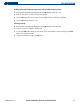
Displaying information for each additional runway:
1) Press the
FMS
Knob
to activate the cursor.
2) Place the cursor on the runway designation field.
3) Turn the
small FMS
Knob to display the next runways for the selected airport.
4) Select the desired runway.
5) Press the
FMS
Knob to remove the flashing cursor.
6) Turn the Joystick counterclockwise to select a lower range and rotate it clockwise to select a higher range.
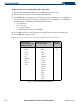
The following descriptions and abbreviations are used on the airport runway information field:
• Type – Usage type: Public, Military, or Private
• Surface – Runway surface types include: Hard, Turf, Sealed, Gravel, Dirt, Soft, Unknown, or Water
• Lighting – Runway lighting types include: No Lights, Part Time, Full Time, Unknown, or Frequency (for
pilot-controlled lighting)