
User Guide



5-51
GPS NAVIGATION
190-00649-00 Rev. A
Garmin G1000 Pilot’s Guide for the Diamond DA42
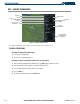
Loading a pilot control lighting frequency into selected COM standby frequency:
1) With the Airport Information Page displayed, press the
FMS
Knob
to activate the cursor.
2) Move the cursor to the ‘PCL FREQ’ field in the Runways Box.
3) Press the
ENT
Key to place the PCL frequency in the standby field of the COM Frequency Window.
4) Press the
FMS
Knob to remove the cursor.
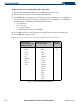
Selecting a runway:
1) With the Airport Information Page displayed, press the
FMS
Knob
to activate the cursor.
2) Place the cursor on the ‘RUNWAYS’ identifier field.
3) Turn the small
FMS
Knob to display the next runway for the selected airport. Continue turning the small
FMS
Knob to select the desired runway.
4) To remove the flashing cursor, press the
FMS
Knob
.