
User Guide



5-50
GPS NAVIGATION
190-00649-00 Rev. A
Garmin G1000 Pilot’s Guide for the Diamond DA42
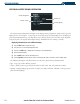
Loading a frequency in the standby COM or NAV Frequency Box:
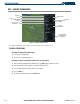
1) With the Airport Information Page displayed, press the
FMS
Knob
to activate the cursor.
2) Move the cursor to the frequencies box on the Airport Information Page.
3) Turn the
FMS
Knob to scroll through the list, placing the cursor on the desired frequency. If a listed frequency
has sector or altitude restrictions, the frequency is preceded by an info (‘i’) designation. Press the
ENT
Key to
view the information. The following may be displayed with the frequency:
• ‘TX’ – transmit only
•
‘RX’ – receive only
• ‘PT’ – part time frequency
• ‘i’ – additional information exists, press the
ENT
Key
4) Press the
ENT
Key to place the selected frequency in the standby field of the COM or NAV Frequency Box.
5) Press the
FMS
Knob to remove the cursor.
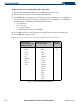
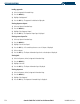
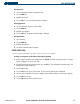
The Airport Frequencies field uses the descriptions and abbreviations listed in Table 5-1:
Communication
Frequencies Which May
Include Restrictions
Communication Frequencies
Without Restrictions
Navigation
Frequencies
Approach
Arrival
Class B
Class C
CAT
Departure
TMA
Terminal
TRSA
ATIS
ASOS
AWOS
Center
Clearance
Gate
Control
Ground
Helicopter
Multicom
Pre-Taxi
Radar
Ramp
Other
Tower
Unicom
ILS
LOC
Table 5-1 Frequency Descriptions and Abbreviations