
User Guide




5-39
GPS NAVIGATION
190-00649-00 Rev. A
Garmin G1000 Pilot’s Guide for the Diamond DA42
5.6 DEPARTURES, ARRIVALS, AND APPROACHES (MFD)
Options
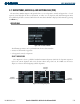
Figure 5-27 Procedures Window
Approach Procedure
Loaded in Active Flight
Plan
Arrival Loaded in Active
Flight Plan
Departure Procedure
Loaded in Active Flight
Plan
The Procedures Window provides direct access to departures, arrivals, and approaches — based upon the
active flight plan or direct-to destination. In either case, the departure and destination airports must have
published procedures associated with them. There are no softkeys associated with the Procedures Window.
The Procedures Window is displayed by pressing the PROC Key.
The Procedures Window displays the information shown in Figure 5-27.
OPERATIONS
DEPARTURE PROCEDURES
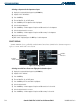
Selecting a departure procedure using the PROC Key:
1) From the Navigation Map Page, press the
PROC
Key. The Procedures Window is displayed.
2) Highlight ‘SELECT DEPARTURE’.
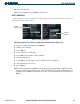
3) Press the
ENT
Key. The DEPARTURE window is displayed on the ‘PROC – DEPARTURE LOADING Page.
4) Select a departure.
5) Press the
ENT
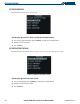
Key. The RUNWAY window may be displayed.
6) Select a runway.
7) Press the
ENT
Key. The TRANSITION window may be displayed.
8) Select a transition.
9) Press the
ENT
Key.