
User Guide




5-38
GPS NAVIGATION
190-00649-00 Rev. A
Garmin G1000 Pilot’s Guide for the Diamond DA42
CHANGE FIELDS
‘Change Fields’ allows the pilot to select the desired data items to be displayed on the Flight Plan window.
The user-selectable data fields can be changed to display the following information:
• Cumulative Distance (CUM)
• Distance (DIS)
• Desired Track (DTK)
• Enroute Safe Altitude (ESA)
• Estimated Time of Arrival (ETA)
• Estimated Time Enroute (ETE)
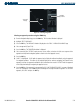
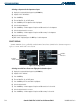
Changing a data field in the Flight Plan Window:
1) From the Flight Plan Window, press the
MENU
Key.
2) Highlight ‘Change Fields’.
3) Then press the
ENT
Key. The cursor flashes on one of the data fields.
4) Highlight the desired field to be changed.
5) Turn the
small FMS
Knob to display a window with optional data items.
6) Select the desired data item.
7) Press the
ENT
Key.
8) Press the
small FMS
Knob to remove the cursor.
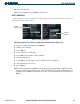
RESTORE DEFAULTS
‘Restore Defaults’ restores all data fields to their default settings.
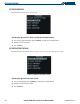
Restoring default settings for data fields in the Flight Plan Window:
1) From the Flight Plan Window, press the
MENU
Key to display the page menu.
2) Highlight ‘Restore Defaults’.
3) Press the
ENT
Key.