
User Guide




5-21
GPS NAVIGATION
190-00649-00 Rev. A
Garmin G1000 Pilot’s Guide for the Diamond DA42
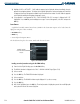
Loading a departure procedure using the Active Flight Plan Page Menu:
1) From the Active Flight Plan Page, press the
MENU
Key.
2) Highlight ‘Load Departure’.
3) Press the
ENT
Key. The DEPARTURE window is displayed on the ‘PROC – DEPARTURE LOADING Page.
4) Select a departure.
5) Press the
ENT
Key. The RUNWAY window may be displayed.
6) Select a runway.
7) Press the
ENT
Key. The TRANSITION window may be displayed.
8) Select a transition.
9) Press the
ENT
Key.
10) With ‘LOAD’ highlighted, press the
ENT
Key. The departure procedure is displayed as part of the overall flight
plan and is placed in front of the enroute flight plan.