
User Guide




5-18
GPS NAVIGATION
190-00649-00 Rev. A
Garmin G1000 Pilot’s Guide for the Diamond DA42
LOAD WAYPOINT
‘Load Waypoint’ allows a waypoint to be added to the flight plan which was selected by panning the
map.
Adding a waypoint to the flight plan which was selected by panning the map:
1) Activate map panning from the Active Flight Plan Page.
2) Select a map position.
3) Press the
MENU
Key.
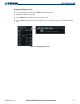
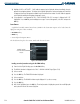
4) Highlight ‘Load Waypoint’ from the list (Figure 5-15).
5) Press the
ENT
Key.
6) The new user waypoint is inserted into the flight plan before the waypoint in the list that was previously
highlighted. If nothing is highlighted, it will be placed at the end of the flight plan.
Figure 5-15 Load Waypoint from Map Panning
Panning Location
Load Waypoint
Option