
User Guide



5-16
GPS NAVIGATION
190-00649-00 Rev. A
Garmin G1000 Pilot’s Guide for the Diamond DA42
ACTIVE FLIGHT PLAN PAGE
Flight Plan Enroute Safe
Altitude
Active Leg
Active Leg
Information
Flight Plan Distance
Remaining
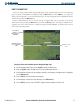
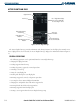
Figure 5-13 Active Flight Plan Page
Flight Plan Title
Flight Plan Total
Distance
List of Flight Plan Display
Rows for the Flight Plan,
not exceeding 31 items
Active/Selected leg
Enroute Safe Altitude
The Active Flight Plan Page provides information and editing functions for the flight plan currently in use.
Once a flight plan has been activated, the Active Flight Plan Page displays the information shown in Figure 5-
13.
GENERAL OPERATIONS
The following operations can be performed from the Active Flight Plan Page:
• Changing the flight plan name
• Loading waypoint from the map
• Loading a departure, approach, or arrival procedure
• Activating a selected leg
• Saving the active flight plan
• Inverting and deleting the active flight plan
• Removing an approach, arrival, or departure procedure
• Accessing the Closest Point of Flight Plan Window
• Changing the configurable data fields in the waypoint list
• Restoring default data fields in the waypoint list
• Removing waypoints from the flight plan
• Creating a user waypoint from the Active Flight Plan Page Map