
User Guide



5-12
GPS NAVIGATION
190-00649-00 Rev. A
Garmin G1000 Pilot’s Guide for the Diamond DA42
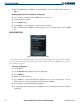
4) With ‘OK’ highlighted, press the
ENT
Key to copy the flight plan. To cancel, highlight ‘CANCEL’ and press the
ENT
Key.
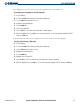
Deleting a flight plan from the Flight Plan Catalog Page:
1) From the Flight Plan Catalog Page, press the
FMS
Knob
to activate the cursor.
2) Highlight the flight plan to delete.
3) Press the
DELETE
Softkey.
4) Press the
ENT
Key. A ‘Delete flight plan?’ confirmation window is displayed.
5) With ‘OK’ highlighted, press the
ENT
Key to delete the flight plan. To cancel, highlight ‘CANCEL’ and press the
ENT
Key:
MENU OPERATIONS
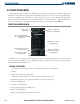
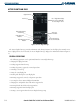
Figure 5-12 Flight Plan Catalog Page Menu
This section describes the operations that are available using the Flight Plan Catalog Page Menu (Figure
5-12). The menu items that are described below are not in order of how they are displayed in the menu list,
but according to typical use.
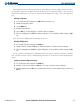
Creating a new flight plan:
1) Press the
FPL
Key.
2) Turn the
small FMS
Knob to display the Flight Plan Catalog Page.
3) Press the
MENU
Key.
4) Highlight ‘Create New Flight Plan’.
5) Press the
ENT
Key. A blank flight plan page is displayed for the first empty storage location. Enter the
identifier, facility, or city name of the departure waypoint and press the
ENT
Key.
6) Enter the identifier for each additional flight plan waypoint.
7) Once all waypoints have been entered, press the
FMS
Knob
to store the flight plan and return to the Flight Plan
Catalog Page.