
User Guide



5-10
GPS NAVIGATION
190-00649-00 Rev. A
Garmin G1000 Pilot’s Guide for the Diamond DA42
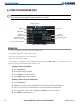
5.4 FLIGHT PLANS (MFD)
Flight planning centers around the three Flight Plan Pages: Flight Plan Catalog, Active Flight Plan, and Vertical
Navigation. The Flight Plan Catalog and Active Flight Plan pages are used to create, edit, and copy flight plans.
The Vertical Navigation Page (described in Section 5.11) is used to create a three-dimensional profile which
provides advisory VNAV information to a final (target) altitude at a specified location. 99 different flight plans
can be created and stored. The Flight Plan (FPL) Page Group is selected by pressing the FPL Key.
FLIGHT PLAN CATALOG PAGE
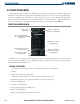
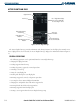
Figure 5-11 Flight Plan Catalog Page
Number of Flight Plan
Storage Slots Remaining
Number of Stored
Flight Plans
Destination for Selected
Stored Flight Plan
List of Stored Flight Plan
Titles Ordered by Flight Plan
Number
Departure Point for Selected
Stored Flight Plan
Total Distance for Selected
Stored Flight Plan
Enroute Safe Altitude
Destination for Selected
Stored Flight Plan
Although it is the second page in the flight plan page group, the Flight Plan Catalog Page is often used first
to create and activate a flight plan. Once a flight plan has been activated, the Flight Plan Catalog Page displays
the information shown in Figure 5-11:
GENERAL OPERATIONS
Operations described in this section can be performed using one of three methods:
• Softkeys
• Flight Plan Catalog Page Options Menu
The loaded departure replaces the current departure with the new selection.
The following operations can be performed from the Flight Plan Catalog Page:
• Creating a new flight plan
• Activating a stored flight plan
• Inverting and activating a stored flight plan
• Editing a stored flight plan
• Copying a stored flight plan into another storage slot