
User Guide



5-4 190-00649-00 Rev. A
Garmin G1000 Pilot’s Guide for the Diamond DA42
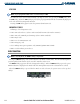
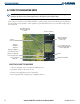
Selecting a direct-to destination by facility or the name of a city:
1) Press the
Direct-to
Key. The Direct-to Window is displayed with the waypoint identifier field highlighted.
2) Highlight the facility or city name field.
3) Enter the facility or city location of the desired waypoint. If duplicate entries exist for the entered facility or city
name, additional entries can be viewed by turning the small
FMS
Knob during the selection process.
4) Press the
ENT
Key to confirm the selected waypoint.
5) Press the
ENT
Key to activate a direct-to.
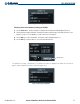
Any waypoint contained in the flight plan can be selected as a direct-to destination from the Direct-to
Window when navigating an active flight plan.
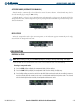
Figure 5-5 Entering a Flight Plan Waypoint
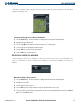
Selecting a direct-to destination from the list of flight plan waypoints:
1) Press the
Direct-to
Key. The Direct-to Window is displayed with the waypoint identifier field highlighted.
2) Highlight the flight plan ‘FPL’ field.
3) Turn the
small FMS
Knob to display a window showing all waypoints in the active flight plan (Figure 5-5).
4) Scroll through the list and highlight the desired waypoint.
5) Press the
ENT
Key to confirm the selected waypoint.
6) Press the
ENT
Key to activate a direct-to.
GPS NAVIGATION