
User Guide


Garmin G1000 Pilot’s Guide for the Diamond DA42
190-00649-00 Rev. A4-32
AUDIO PANEL AND CNS
Loading a COM frequency into the COM tuning box:
1) When the list of frequencies for the selected airport is displayed, highlight the desired frequency by turning the
large
FMS
Knob.
2) Press the
ENT
Key.
3) Press the Frequency Transfer Key to transfer the COM frequencies between the standby and active frequency
fields
The Pilot Controlled Lighting (PCL) frequency, located in the Runways box of the INFO portion of the
Airport Information Page, may also be highlighted and loaded into the COM tuning box.
Loading the primary approach NAV frequency into the NAV tuning box:
1) On the Airport Information Page, press the
APR
Softkey to display approach information for a specific airport.
2) Press the
FMS
Knob to activate the selection cursor.
3) Turn the large
FMS
Knob to highlight the primary NAV frequency located in the Primary Frequency Box.
4) Press the
ENT
Key.
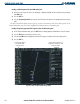
Figure 4-37 WPT – Airport Information Page (APR)
ILS Frequency Loaded
into Standby NAV
Frequency Field
Tower and Ground Control
Frequencies Loaded into COM
Frequency Fields