
User Guide


190-00649-00 Rev. A
Garmin G1000 Pilot’s Guide for the Diamond DA42
4-29
AUDIO PANEL AND CNS
4.6 AUTO-TUNING
NOTE: Turn the FMS Knob to scroll through a list of frequencies.
The G1000 system offers multiple auto-tuning capabilities. COM frequencies for the nearest airports can be
auto-tuned from the PFD. The MFD provides auto-tuning of both COM and NAV frequencies from waypoint and
nearest pages. The primary NAV frequency is entered automatically in the NAV Frequency Box during approach
loading or approach activation.
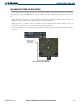
Press the
ENT
key to load a
highlighted frequency into
the frequency box.
Turn the
FMS
knob to scroll
through a list
of frequencies.
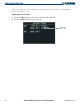
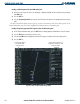
Figure 4-34 Loading Frequencies
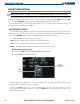
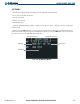
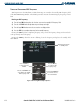
Frequencies can be automatically loaded into the frequency boxes in the following ways:
• By using the
ENT
Key when the frequency is highlighted on the appropriate page (PFD and MFD).
• When loading or activating an approach (PFD and MFD).
Frequencies loaded from the displays are automatically entered into the COM and NAV standby fields.