
User Guide


190-00649-00 Rev. A
Garmin G1000 Pilot’s Guide for the Diamond DA42
4-25
AUDIO PANEL AND CNS
ADF TUNING
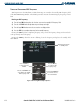
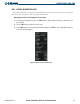
The following ADF information is displayed in the ADF/DME Tuning Window:
• Active and standby ADF frequencies
• ADF Receiver Mode
• ADF Receiver Volume
• DME Tuning Mode
When the ADF/DME Tuning Window is displayed, the selection cursor is displayed over the standby ADF
frequency field.
Turning the large
FMS
Knob moves the selection cursor through the various fields (standby ADF frequency,
ADF Receiver Mode, ADF radio volume and DME Tuning Mode). Pressing the
FMS
Knob activates/deactivates
the selection cursor in the ADF/DME Tuning Window.
ADF Mode
Figure 4-29 ADF/DME Tuning Window
Active ADF Frequency
Standby ADF Frequency
DME Mode
ADF Volume