
User Guide


Garmin G1000 Pilot’s Guide for the Diamond DA42
190-00649-00 Rev. A4-24
AUDIO PANEL AND CNS
ADF/DME TUNING (OPTIONAL)
NOTE: When another PFD window is turned on, the ADF/DME Tuning Window is replaced on the PFD.
The G1000 system tunes the optional ADF receiver and DME transceiver. The ADF is tuned by entering the
frequency in the ADF standby frequency field. The ADF frequency is entered using the
FMS
Knob and the
ENT
Key. Pressing the
ADF/DME
Softkey toggles the ADF/DME Tuning Window ON and OFF.
The UHF DME frequency is paired with a VHF NAV frequency. Frequency pairing is automatic and only the
VHF NAV frequency is shown on the display.
DME FREQUENCY PAIRING
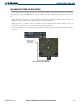
The ADF/DME Tuning Window is located to the right of the HSI on the lower right corner of the PFD. The
DME transceiver is tuned by selecting the associated NAV system or HOLD in the ADF/DME Tuning Window.
Pressing the
ADF/DME
Softkey toggles the ADF/DME Tuning Window ON and OFF.
The following DME transceiver pairing can be selected:
•
NAV1
– Tunes the DME frequency from the selected NAV1 frequency.
•
NAV2
– Tunes the DME frequency from the selected NAV2 frequency.
•
HOLD
– The DME frequency remains tuned to the last selected NAV frequency.
Selecting DME transceiver pairing:
1) Turn the small
FMS
Knob to select the desired DME transceiver pairing.
2) Press the
ENT
Key to complete the selection.
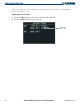
Figure 4-28 ADF/DME Tuning Window
DME
Modes
DME is
Currently Paired
with NAV1
When turning ON the G1000 for use, the system remembers the last frequency the DME is paired with, and
the NAV1, NAV2, or HOLD state prior to shutdown.
Pressing the
CLR
Key while in the process of DME pairing cancels the data entry and reverts back to
the previously selected DME tuning state. Pressing the
FMS
Knob activates/deactivates the cursor in the
ADF/DME Tuning Window.