
User Guide

190-00592-01 Rev. A
Garmin G1000 Pilot’s Guide for the Diamond DA40/40F
4-8
AUDIO PANEL AND CNS
COM TRANSCEIVER MANUAL TUNING
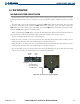
The COM frequency controls and frequency boxes are on the right side of the PFD and MFD.
Manually Tuning a COM Frequency:
1) Turn the
COM
Knob to tune the desired frequency in the COM Tuning Box.
2) Press the
Frequency Transfer
Key to transfer the frequency to the COM Active Frequency Field.
3) Adjust the volume level with the COM VOL/SQ Knob
.
4) Press the COM VOL/SQ Knob to turn automatic squelch on and off.
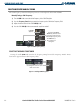
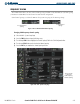
Figure 4-6 COM Frequency Tuning
Pressing the
Frequency
Transfer
Key Transfers COM
Frequencies Between Active
and Standby Frequency Boxes
Turn
COM
Knob to
Tune Frequency in
Tuning Box
COM
VOL/
SQ
Knob
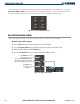
SELECTING THE RADIO TO BE TUNED
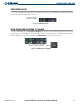
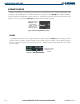
Pressing the small COM Knob transfers the frequency tuning box and the Frequency Transfer Arrow
between the upper and lower radio frequency fields.
Figure 4-7 Switching COM Tuning Boxes
Pressing the
COM
Knob Switches
the Tuning Box From One COM
Radio to the Other