
User Guide


190-00592-01 Rev. A
Garmin G1000 Pilot’s Guide for the Diamond DA40/40F
3-7
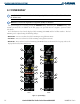
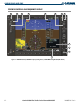
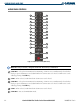
ENGINE INDICATION SYSTEM
1
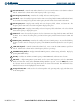
Engine Manifold Pressure
Gauge (MAN IN)
DA40 only
Displays engine power in inches of Mercury (in Hg)
2
Tachometer (RPM)
Shows propeller speed in revolutions per minute (rpm); the red band
indicates propeller overspeed
3
Oil Temperature (OIL °F)
Engine oil temperature is shown in degrees Fahrenheit (°F)
4
Oil Pressure (OIL PSI)
Pressure of oil supplied to the engine is displayed in pounds per
square inch (psi)
5
Voltmeter (VOLTS)
Shows the primary
bus voltage
6
Ammeter (AMPS)
Shows the alternator load in amperes
7
Fuel Flow (FFLOW GPH)
Displays current fuel flow in gallons per hour (gph)
8
Fuel Pressure (FPRESS PSI)
DA40 only option
Shows the fuel pressure in pounds per square inch (psi)
9
Fuel Remaining (GAL REM)
Current fuel remaining in gallons as set by the pilot and adjusted for
fuel burn since last set
10
Fuel Used (GAL USED)
Quantity of fuel used in gallons
11
Endurance (ENDUR)
Flight time remaining with fuel onboard (HH:MM when more than
an hour remains)
12
Range (RANGE NM)
Aircraft range in nautical miles
13
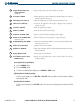
Total Time in Service (TTL
TIME IN SVC)
Displays the total flight hours and is activated when the aircraft
becomes airborne
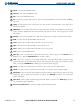
Accessing the EIS System Display:
1) Press the ENGINE Softkey.
2) Press the SYSTEM Softkey.
3) To return to the default Engine Display, press the ENGINE or BACK Softkey.
Adjusting the fuel totalizer quantity:
From the System Display, press the
DEC FUEL or INC FUEL
Softkey to obtain the desired number of gallons
remaining (GAL REM).
Resetting the fuel totalizer:
From the System Display, press the
RST FUEL
Softkey. This also resets the displayed fuel remaining (GAL REM)
to zero.