
User Guide


Garmin G1000 Pilot’s Guide for the Diamond DA40/40F
190-00592-01 Rev. A3-6
ENGINE INDICATION SYSTEM
3.3 SYSTEM DISPLAY
NOTE: Fuel calculations do not use the aircraft fuel quantity indicators and are calculated from the last time
the fuel was reset.
NOTE: Refer to the Aircraft Flight Manual Supplement (AFMS) for limitations.
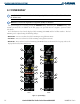
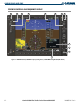
The System Display is accessed by pressing the ENGINE Softkey, followed by the SYSTEM Softkey. The
readouts presented here, in addition to the dial gauges, are separated into two categories: System and Fuel
Calculation.
Fuel calculations are based on the displayed fuel remaining (GAL REM) and the fuel flow totalizer. The fuel
remaining can be adjusted using the following
softkeys:
• DEC FUEL – Decreases totalizer-based fuel remaining in one-gallon increments
• INC FUEL – Increases totalizer-based fuel remaining in one-gallon increments
• RST FUEL – Resets totalizer-based fuel remaining (GAL REM) relative to the aircraft’s fuel capacity and sets the
displayed fuel used (GAL USED) to zero
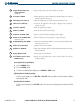
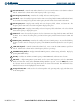
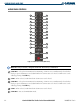
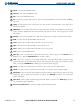
Figure 3-5 System Display
DA40
1
2
3
6
4
10
12
8
5
7
9
11
13
DA40F
2
3
6
4
10
12
5
7
9
11
13