
User Guide


Garmin G1000 Pilot’s Guide for the Diamond DA40/40F
190-00592-01 Rev. A2-16
FLIGHT INSTRUMENTS
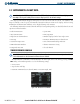
When a bearing pointer is displayed, its associated information window is also displayed. The Bearing
Information windows are displayed to the lower sides of the HSI and show:
• Bearing source (NAV, GPS, ADF)
• Pointer icon (single line for BRG1, double line for BRG2)
• Frequency (NAV, ADF)
• Station/waypoint identifier (NAV, GPS)
• GPS-derived great circle distance to bearing source
If the NAV radio is the bearing source and is tuned to an ILS frequency, the bearing pointer is removed from
the HSI and the frequency is replaced with “ILS”. If the NAV radio is not receiving the tuned VOR station, the
bearing pointer is removed from the HSI and the frequency displayed in the information window is replaced
with ‘NO DATA’. When NAV1 or NAV2 is the selected bearing source, the frequency is replaced by the station
identifier when the station is within range.
If GPS is the bearing source, the active waypoint identifier is displayed in lieu of a frequency. If an active
waypoint is not selected, the bearing pointer is removed from the HSI and ‘NO DATA’ is displayed in the
information window.
Selecting bearing display and changing sources:
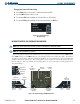
1) Press the PFD Softkey.
2) Press a BRG Softkey to display the desired bearing pointer and information window with a NAV source.
3) Press the BRG Softkey again to change the bearing source to GPS.
4) Press the BRG Softkey a third time to change the bearing source to ADF.
5) To remove the bearing pointer and information window, press the BRG Softkey again.
DME INFORMATION WINDOW
NOTE: Refer to the Audio Panel and CNS Section for information on tuning the radios.
NOTE: DME radio installation is optional.
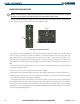
The DME Information Window (Figure 2-22) may be enabled/disabled by pressing the DME Softkey (a
second-level PFD softkey).
The DME Information Window is displayed above the BRG1 Information Window
and shows the DME label, tuning mode (NAV1, NAV2, or HOLD), frequency, and distance. When a signal is
invalid, the distance is replaced by “–.– – NM”.