
User Guide




190-00592-01 Rev. A
Garmin G1000 Pilot’s Guide for the Diamond DA40/40F
6-35
HAZARD AVOIDANCE
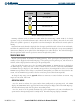
TIS Symbol Description
Non Threat Traffic
Proximity Advisories (PA)
Traffic Advisories (TA)
Traffic Advisory Off Scale
Table 6-6 Additional System Annunciations
Proximity Advisories (PAs) are defined as traffic within the 5.0-nm range, within ±1200 ft. of altitude
separation. They are not Traffic Advisories (TA). When traffic meets the advisory criteria for the TA a solid
yellow circle symbol is generated. TIS provides vector lines showing the direction that the aircraft symbol is
moving.
Deviation from aircraft altitude is displayed above the target symbol if the traffic is above the aircraft altitude,
and below the symbol if the traffic is below the altitude. Altitude trend is displayed as an up arrow (+500 fpm),
down arrow (-500 fpm), or no symbol if less than 500 fpm rate in either direction. The traffic label displays
altitude separation and the vertical speed sense arrow to the right of the symbol.
TRAFFIC MAP PAGE
The TIS system performs an automatic test during power-up. If the system passes the power-up test, the
standby screen is displayed on the Traffic Map Page. If the system passes the power-up test, and the aircraft is
airborne, traffic is displayed on the Traffic Page in the operating mode.
If the system fails the power up test, the ‘NO DATA’, ‘DATA FAILED’, or ‘FAILED’ message is displayed on
the Traffic Map Page. Contact the service center or Garmin dealer for corrective action if the ‘DATA FAILED’
or ‘FAILED’ message is displayed. (The ‘FAILED’ message indicates the Transponder has failed. The ‘DATA
FAILED’ message indicates data is being received from the Transponder, but a failure was detected in the data
stream. The ‘NO DATA’ message indicates that data is not being received from the Transponder.)
To change the map range, turn the
Joystick clockwise to zoom out or counter-clockwise to zoom in. Map
ranges are 2 nm, 6 nm, and 12 nm.
OPERATING MODE
Once the aircraft is airborne, the system switches from standby mode to operating mode. The G1000
displays ‘TIS OPERATING’ in the upper left-hand corner and begins to display traffic on the Traffic Map Page.
The TIS Traffic Advisory (TA) alerts the pilot to an intruding aircraft.
Once the aircraft is on the ground (determined by system configuration at the time of installation) the
system switches from operating mode to standby mode. The Traffic Map Page displays ‘STANDBY’.