
User Guide




Garmin G1000 Pilot’s Guide for the Diamond DA40/40F
190-00592-01 Rev. A6-34
HAZARD AVOIDANCE
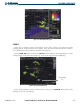
Traffic Banner
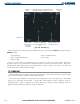
Traffic Out of
Range
Traffic 1600’ Above and
Climbing, Moving in the
Direction of the Line
Operating
Mode
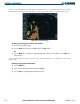
Figure 6-44 Traffic Map Page
Proximity Traffic at Same
Altitude, Level Flight and
Moving in the Direction of the
Line
Traffic Advisory, Aircraft is 400’ Above and
Descending, Moving in the Direction of the Line
Last Data
Update is Older
than 6 Seconds,
Resulting in
Coast Mode
Traffic information can be displayed on the following other pages by pressing the MAP Softkey, followed by the
TRAFFIC Softkey:
• Navigation Map • AUX - Trip Planning Page
• WPT - VOR Information Page • Nearest Pages
• PFD Inset Map
If data is not received for a period longer than six seconds, the age of the present data will be displayed in
the lower left of the screen along with the annunciation that the system has entered Coast mode. The system
will maintain the traffic display (up to 60 seconds) until the next data reception. If no data is received after 60
seconds, traffic will be removed from the display.
TIS SYMBOLOGY
Traffic Information Service (TIS) is designed to help pilots detect and avoid aircraft intersecting their flight
path. TIS uses the Mode S transponder for the traffic data link.
TIS receives traffic information from ground stations and provides a five-second update rate. The G1000
displays up to eight traffic targets within a 7.5 nm radius, from 3,000 feet below to 3,500 feet above the
requesting aircraft. Traffic is displayed on the Traffic Map Page according to TCAS symbology. Traffic is
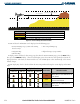
displayed using four different symbols (as shown in Table 6-6).