
User Guide




Garmin G1000 Pilot’s Guide for the Diamond DA40/40F
190-00592-01 Rev. A6-32
HAZARD AVOIDANCE
SETTING UP THE NAVIGATION MAP PAGE
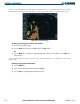
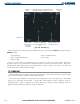
Use the Map Setup Window (as shown in Figure 6-43) to customize the display of obstacle and terrain data
on the Navigation Map Page. Obstacles are displayed based on the selection of each feature.
Figure 6-43 Map Setup Window
Setting up and customizing the Navigation Map Page:
1) On the Navigation Map Page, press the MENU Key.
2) While the ‘Map Setup’ selection is highlighted on the Page Menu, press the ENT Key.
3) Turn the small FMS Knob to display the group selection window. To select the ‘Map’ group, turn the FMS Knob
and press the ENT Key.
4) While the Map Setup menu is displayed, turn the large FMS Knob to highlight and move between the selections.
When an item is highlighted, turn the small FMS Knob to select the desired option and press the ENT Key.
Table 6-5 shows the options for displaying terrain and obstacle data on the Navigation Map only. It does
not apply to other maps.
TERRAIN DATA OBSTACLE DATA DISPLAYED ON NAVIGATION MAP PAGE
OFF OFF No obstacles or terrain displayed
OFF ON SAFE, CAUTION, and WARNING obstacles
displayed
ON OFF CAUTION and WARNING terrain displayed
ON ON SAFE, CAUTION, and WARNING obstacles and
terrain displayed
Table 6-5 Obstacle Data on the Navigation Map Page