
User Guide




Garmin G1000 Pilot’s Guide for the Diamond DA40/40F
190-00592-01 Rev. A6-16
HAZARD AVOIDANCE
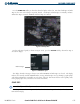
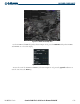
Cloud Tops data displays only on the Weather Data Link Page. It does not display on other G1000 maps.
Press the CLD TOP
Softkey to show the cloud top altitude. Note that Cloud Tops and Echo Tops use the
same color scaling to represent altitude. Cloud Tops and Echo Tops are mutually exclusive. When Cloud
Tops is activated, Echo Tops is removed.
Figure 6-16 Cloud Tops Data
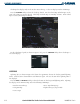
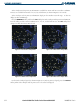
For the Cloud Tops legend (as shown in Figure 6-17), press the LEGEND Softkey when Cloud Tops is
selected for display.
Figure 6-17 CLOUD TOPS Legend
LIGHTNING
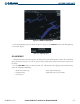
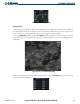
Lightning data (as shown in Figure 6-18) shows the approximate location of cloud-to-ground lightning
strikes. Strike location is shown within a two kilometer region. The exact location of the lightning strike is
not displayed.
Press the LTNG or XM LTNG Softkey to show the location of cloud-to-ground lightning strikes. Lightning
data displays on the PFD Inset Map and on the following G1000 maps:
• Weather Data Link Page • AUX - Trip Planning Page
• Navigation Map • Flight Plan Pages (except VNAV)
• Nearest Pages