
User Guide




190-00592-01 Rev. A
Garmin G1000 Pilot’s Guide for the Diamond DA40/40F
6-15
HAZARD AVOIDANCE
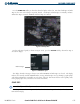
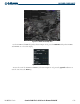
Press the ECHO TOP Softkey to show data about the highest radar echo. Note that Cloud Tops and Echo
Tops use the same color scaling to represent altitude. Cloud Tops and Echo Tops are mutually exclusive.
When Echo Tops is activated, NEXRAD and Cloud Tops are removed.
Figure 6-14 Echo Tops Data
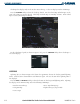
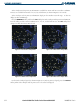
For the Echo Tops legend (as shown in Figure 6-15), press the
LEGEND Softkey when Echo Tops is
selected for display.
Radar Coverage
Figure 6-15 ECHO TOPS Legend
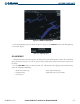
The display of Radar Coverage is always active when NEXRAD and Echo Tops are selected. The display
indicates the currently available NEXRAD Radar coverage and Echo Tops areas by showing a grayish-purple
color where information is unavailable or is not being collected. This means that the radar capability exists
in the grayish-purple areas, but that it is not active or is off-line.
CLOUD TOPS
NOTE: Cloud Tops and Echo Tops cannot be turned on at the same time.
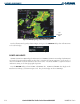
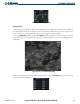
Cloud Tops data (as shown in Figure 6-16) shows the altitude at the top of the clouds. This is determined
from satellite imagery.