
User Guide



Garmin G1000 Pilot’s Guide for the Diamond DA40/40F
190-00592-01 Rev. A6-8
HAZARD AVOIDANCE
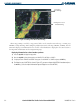
Figure 6-6 Panning on the Weather Data Link Page
Information
about Warning
Panning Arrow over a
Tornado Warning
When map panning is enabled, a map pointer flashes on the Weather Data Link Page. Panning over
AIRMETs, County Warnings, TFRs (Temporary Flight Restrictions), Echo Tops, METARs, SIGMETs, and Cell
Movement displays text information for the selection. This information is displayed in the same location as
the Map Pointer Information on the Navigation Map Page.
Displaying information for selected weather products:
1) Press the
Joystick
to display the map pointer.
2) Move the
Joystick
to place the map pointer on AIRMETs, TFRs, METARs or SIGMETs.
3) To display the text of AIRMET and SIGMET alerts, pan over the AIRMET or SIGMET and press the
ENT
Key.
4) To display the text of a METAR (as shown in Figure 6-7), pan over an airport with METAR information and press
the
ENT
Key. (Select the Airport Information Page to display the text of the METAR.)