
User Guide


190-00592-01 Rev. A
Garmin G1000 Pilot’s Guide for the Diamond DA40/40F
6-3
HAZARD AVOIDANCE
Each weather product is refreshed on the display at specific intervals (as shown in Table 6-1). The refresh
rate represents the maximum waiting period for data to appear on the display after the Data Link Receiver is
activated. It does not represent the rate at which XM Weather data is updated. Weather data is updated at
intervals that are defined and controlled by XM Satellite Radio.
If, for any reason, the data for a weather product is not refreshed within a 30-, 60-, or 90-minute interval
(as specified in Table 6-1), the data is considered expired and is removed from the display. This prevents the
display of ineffective data. If more than half of the expiration time has elapsed, the color of the product and
time changes from light blue to amber.
Selecting the Weather Data Link Page:
1) Turn the large
FMS
Knob to select the Map Page Group.
2) Turn the small
FMS
Knob to select the Weather Data Link Page.
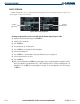
Figure 6-2 Weather Data Link Page
NEXRAD
Products, Storm
Legend, and Age