
User Guide




190-00592-01 Rev. A
Garmin G1000 Pilot’s Guide for the Diamond DA40/40F
5-91
GPS NAVIGATION
OR:
1) With the Departure Loading Page displayed (Figure 5-92), press the
FMS
Knob to activate the cursor.
2) Enter an identifier, facility name or city location field.
3) Press the E
NT
Key until the DEPARTURE window is displayed.
4) Select a departure.
5) Press the E
NT
Key. The RUNWAY window may be displayed.
6) Select a runway.
7) Press the E
NT
Key. The TRANSITION window may be displayed.
8) Select a transition.
9) Press the E
NT
Key. The departure is now ready to load.
10) Press the
FMS
Knob to remove the cursor.
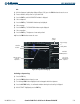
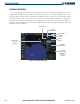
Figure 5-92 Departure Loading Page
Identifier
Facility Name
Location
Available
Departures
List of Legs
in Departure
Sequence
Map Showing
Selected
Departure
Airport
Symbol
Airport Usage
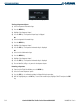
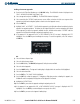
Activating a departure leg:
1) Press the FPL Key.
2) Press the FMS Knob to activate the cursor.
3) Turn the large FMS Knob to highlight the desired waypoint within the departure.
4) Press the ACT LEG Softkey. A confirmation window showing the selected leg is displayed.
5) With ‘ACTIVATE’ highlighted, press the ENT Key.