
User Guide



Garmin G1000 Pilot’s Guide for the Diamond DA40/40F
190-00592-01 Rev. A5-88
GPS NAVIGATION
ACTIVATE LEG
‘Activate Leg’ selects the highlighted leg as the “active leg” (the flight plan leg which is currently used for
navigation guidance).
Activating a flight plan along a specific leg:
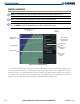
1) Press the FPL Key on the PFD to display the Flight Plan Window.
2) Press the FMS Knob to activate the cursor.
2) Highlight the desired destination waypoint.
3) Press the MENU Key
4) Highlight ‘Activate Leg’.
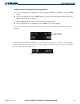
5) Press the ENT Key. A confirmation window is displayed with ‘ACTIVATE’ highlighted.
6) Press the ENT Key.
STORE FLIGHT PLAN
The active flight plan is erased when the G1000 is powered off or when another flight plan is activated.
When storing flight plans with an approach, departure or arrival, the G1000 uses the waypoint information
from the current database to define the waypoints in the flight plan. If the navigation database is changed
or updated, the G1000 automatically updates the information if the procedure has not been modified. If an
approach, departure or arrival procedure is no longer available, the flight plan becomes “locked” until the
procedure is deleted from the flight plan or until the correct navigation database is installed.
Storing a flight plan:
1) Press the FPL Key on the PFD to display the Flight Plan Window.
2) Once all of the waypoints have been entered, press the MENU Key to display the menu.
2) Select ‘Store Flight Plan’.
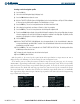
3) Press the ENT Key. The Store Flight Plan Window is displayed with ‘OK’ highlighted.
4) Press the ENT Key to store the flight plan in the next available memory slot.
5) Press the ENT Key.
INVERT FLIGHT PLAN
‘Invert Flight Plan’ reverses the active flight plan. After traveling along a flight plan, the pilot may wish to
reverse the route for navigation back to the original departure point.