
User Guide



Garmin G1000 Pilot’s Guide for the Diamond DA40/40F
190-00592-01 Rev. A5-86
GPS NAVIGATION
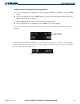
The VNAV messages are not enabled until the ‘VNAV Messages On?’ option is enabled from the VNAV Page
Menu (Figure 5-87). To display the Page Menu, press the
MENU
Key (with the VNAV Page displayed). The
VNAV Page Options Menu also allows the pilot to restore VNAV page defaults.
Figure 5-87 Vertical Navigation Page Menu
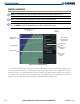
To view the vertical speed required on any MFD Page, a field in the Navigation Data Box must be configured
to display VSR (Figure 5-88, see the System Setup Page Instructions for details).
Figure 5-88 Vertical Navigation Page Menu
FLIGHT PLANNING FROM THE PFD
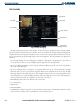
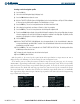
Flight planning on the PFD centers around the Flight Plan Window (Figure 5-89) where flight plans can be
created, edited, and activated. The Flight Plan Window is enabled and disabled by pressing the
FPL
Key.
Desired Track
Next Available
Memory Position
Figure 5-89 Flight Plan Window
Flight Plan Title
Leg Distance
Active Leg