
User Guide



Garmin G1000 Pilot’s Guide for the Diamond DA40/40F
190-00592-01 Rev. A5-84
GPS NAVIGATION
VERTICAL NAVIGATION
NOTE
: An active flight plan or direct-to must be entered in order to utilize the VNAV feature.
NOTE
: The Vertical Navigation Page Map orientation is always ‘Desired Track Up’.
NOTE
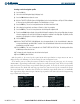
: The VNAV messages (Figures 5-85 and 5-86) will only be displayed if the VNAV messages are enabled.
Press the MENU Key while on the VNAV Page to enable or disable the messages.
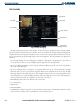
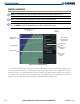
Figure 5-84 Vertical Navigation Page
Target Distance (from
reference)
Target Altitude
Descent Rate
Target
Reference
Map Legend
Target
Vertical Speed
Required
Time to Begin
Descent or
Climb
Target Altitude
Reference (above
WPT or MSL)
Target Altitude
Waypoint
The Vertical Navigation feature allows the creation of a three-dimensional profile which gives guidance from
the present position and altitude to a final (target) altitude at a specified location. This is helpful when the pilot
wants to descend to a certain altitude near an airport or climb to an altitude before reaching a route or direct-
to waypoint. Once the profile is defined, message alerts and additional data on the PFD informs the pilot of
progress. The Vertical Navigation Page displays the information shown in Figure 5-84.