
User Guide


190-00592-01 Rev. A
Garmin G1000 Pilot’s Guide for the Diamond DA40/40F
5-29
GPS NAVIGATION
Canceling Direct-to navigation:
1) Press the
Direct-to
Key.
2) Press the
MENU
Key to display the Direct-to options menu (Figure 5-25).
3) With ‘Cancel Direct-To NAV’ highlighted, press the
ENT
Key. If a flight plan is still active, the G1000 resumes
navigating the flight plan along the closest leg.
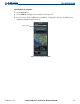
Cancel Option
Figure 5-25 Canceling Direct-to Option