
User Guide




190-00592-01 Rev. A
Garmin G1000 Pilot’s Guide for the Diamond DA40/40F
5-27
GPS NAVIGATION
Selecting a Direct-to destination to a flight plan waypoint:
1) While navigating an active flight plan, press the
Direct-to
Key.
2) Turn the small
FMS
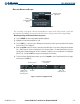
Knob to the left to display a list of flight plan waypoints as shown in Figure 5-23.
FPL Waypoints
Figure 5-23 Flight Plan Waypoint List
3) Select the desired waypoint.
4) Press the
ENT
Key. The cursor is now displayed on ‘ACTIVATE?’.
5) Press
ENT
again to activate a Direct-to.
Selecting a Direct-to destination to a nearest airport:
1) Press the
Direct-to
Key.
2) Turn the small
FMS
Knob to the left. Initially, a flight plan waypoint list is displayed as in Figure 5-24. The list
is populated only when navigating a flight plan.