
User Guide



190-00552-00 Rev. A
Garmin G1000 Pilot’s Guide for the Columbia 350/400
4-17
AUDIO PANEL AND CNS
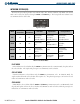
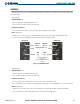
SWITCHING BETWEEN RADIOS
Pressing the small
COM
or
NAV
Knob transfers the tuning box between the upper and lower radio frequency
fields.
When the other COM Transceiver is selected on the Audio Panel, the COM Frequency Tuning Box highlights
the selected frequency on both the PFD and MFD.
When a different NAV radio is selected on the HSI, the NAV Frequency Tuning Field is highlighted in green
on the PFD and MFD. The active NAV frequencies are shown in white when GPS Mode is selected.
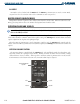
Pushing the small
COM
Knob
switches the tuning box from one
COM radio to the other
Pushing the small
NAV
Knob
switches the tuning box from one
NAV radio to the other
Figure 4-16 Switching NAV and COM Radios
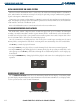
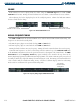
RADIO INDICATORS
•
RX
– During COM signal reception, a white ‘RX’ appears by the active COM frequency replacing the Frequency
Transfer Arrow.
• TX – During COM transmission, a white ‘TX’ appears by the active COM frequency replacing the Frequency
Transfer Arrow.
• ID – When the Morse Code Identifier is ON for a NAV radio, a white ‘ID’ appears to the left of the active NAV
frequency.
The Morse Code Identifier
is ON for the GHM VOR
Figure 4-17 COM Radio Transmit and NAV Radio ID Indications
Receive and Transmit
Indications