
User Guide



190-00552-00 Rev. A
Garmin G1000 Pilot’s Guide for the Columbia 350/400
4-15
AUDIO PANEL AND CNS
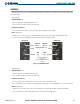
CONTROLS
The NAV Frequency Box is controlled by knobs and keys on the left, the COM Frequency Box by knobs and
keys on the right.
NAV Controls:
•
VOL/PUSH ID
Knob
– Turn to adjust the NAV Radio Volume Level
– Press to turn the Morse Code ID ON and OFF
•
Frequency Transfer
Key
– Press to transfer the NAV frequencies between the standby and active fields
•
NAV
Tuning Knob
– Turn to tune a NAV frequency in the NAV Tuning Box (large knob for MHz, small knob for kHz)
– Press to transfer the NAV Tuning Box between the NAV1 and NAV2 radios
Figure 4-13 NAV/COM Controls
Frequency Transfer
Keys
NAV
Knob
COM
Knob
VOL/PUSH
ID
Knob
VOL/PUSH
SQ
Knob
NAV Controls COM Controls
Turn to tune desired
frequencies.
Press to change tuning box
positions.
COM Controls:
•
VOL/PUSH SQ
Knob
– Turn to adjust the COM Radio Volume Level
– Press to turn Automatic Squelch ON and OFF
•
Frequency Transfer
Key
– Press to transfer the COM frequencies between the active and standby fields
– Press and hold for two seconds to tune the Emergency Frequency (121.500 MHz) in the active COM field
•
COM
Tuning Knob
– Turn to tune a COM Frequency in the COM Tuning Box (large knob for MHz; small knob for kHz)
– Press to transfer the COM Tuning Box between the COM1 and COM2 radios