
User Guide



190-00552-00 Rev. A
Garmin G1000 Pilot’s Guide for the Columbia 350/400
4-11
AUDIO PANEL AND CNS
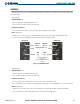
INTERCOM MANUAL SQUELCH CONTROL
The intercom squelch function has the ability to quiet the ambient cockpit noise when no person is talking.
Each microphone input has an automatic squelch threshold. Manual squelch adjustment is also available if
desired.
Pressing the
MAN SQ
Key toggles between the Automatic and Manual Squelch Mode. When in Manual
Squelch, the MAN SQ Annunciator is lit.
In Manual Squelch Mode the
VOL/SQ
Knob adjusts either the volume or squelch threshold level.
Pressing the
VOL/SQ
Knob toggles between volume and squelch adjustment. The annunciator at the
bottom of the unit indicates which function the knob is controlling.
In Manual Squelch Mode (‘SQ’ Annunciator at the bottom is lit), the small
VOL/SQ
Knob controls pilot
squelch threshold. The large
VOL/SQ
Knob controls copilot/passenger squelch threshold. Turning either
knob clockwise increases squelch level, counterclockwise decreases squelch level.
ENTERTAINMENT INPUTS
NOTE: MUSIC 1 and MUSIC 2 cannot be completely turned off. Audio level for these inputs can be set above
and below a nominal value. Contact a Garmin-authorized service center for adjustment.
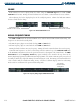
The Audio Panel provides two stereo auxiliary entertainment inputs: MUSIC 1 and MUSIC 2. These inputs
are compatible with popular portable entertainment devices such as MP3 and CD players. Two 3.5 mm
stereo phone jacks are installed in convenient locations for audio connection. The headphone outputs of the
entertainment devices are plugged into the MUSIC 1 or MUSIC 2 jacks.
The current ICS isolation mode affects the distribution of the entertainment input MUSIC 1.
MUSIC 1
MUSIC 1 can be heard by the pilot in COPILOT Mode and in ALL Mode, and can be heard by the copilot
in PILOT Mode and in ALL Mode.
MUSIC 1 MUTING
MUSIC 1 muting occurs when aircraft radio or marker beacon activity is heard. MUSIC 1 is always soft-
muted when an interruption occurs from an aircraft radio. Soft muting is the gradual return of MUSIC
1 to its original volume level. The time required for MUSIC 1 volume to return at the headset outputs is
between one-half and four seconds.
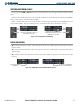
MUSIC 1 MUTING ENABLE/DISABLE
Pressing and holding the
MKR/MUTE
Key for three seconds toggles MUSIC 1 muting ON and OFF.
When toggling, either one or two beeps can be heard; one beep indicates that music muting is enabled, two
beeps indicate music muting is disabled.
MUSIC 2
MUSIC 2 can be heard only by the passengers and is never muted.