
User Guide



Garmin G1000 Pilot’s Guide for the Columbia 350/400
190-00552-00 Rev. A4-8
AUDIO PANEL AND CNS
MARKER BEACON SIGNAL SENSITIVITY
Pressing the
HI SENS
Key (Figure 4-5) selects increased marker beacon signal sensitivity. The HI SENS
function is used to receive an earlier indication when nearing a marker during an approach.
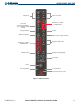
NAVIGATION RADIOS
Pressing
NAV1
or
NAV2
Keys select and deselect the radio source and the annunciator (Figure 4-6). Selected
audio can be heard over the headset and the speaker. All radio keys can be selected independently.
When no further navigation radio audio is heard, the amount of background noise is reduced by the
Master
Avionics Squelch (MASQ) feature.
Figure 4-6 Navigation Radio Keys and Annunciators
Disabled on
Columbia 350/400
Aircraft