
User Guide



190-00552-00 Rev. A
Garmin G1000 Pilot’s Guide for the Columbia 350/400
4-7
AUDIO PANEL AND CNS
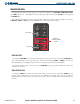
SPEAKER
All of the radios can be heard over the cabin speaker. Pressing the
SPKR
Key selects and deselects the cabin
speaker (Figure 4-3). Speaker audio is muted when the PTT Key is pressed.
The speaker volume is adjustable above and below a nominal value. Contact a Garmin-authorized service
center for details.
MARKER BEACON RECEIVER
NOTE: The Marker Beacon Indicators operate independently of the Marker Beacon Audio and cannot be
turned off.
DESCRIPTION AND OPERATION
The Audio Panel marker beacon is used as part of the ILS system. The Marker Beacon Receiver is always
ON and receives at 75 MHz. The Audio Panel provides a Marker Beacon Audio muting capability.
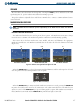
The receiver detects the three marker tones, outer, middle, and inner, and illuminates the appropriate
Marker Beacon Indicators. The Marker Beacon Indicators are located to the left of the altimeter on the PFD
(Figure 4-4).
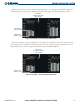
Outer Marker Indication Middle Marker Indication Inner Marker Indication
Figure 4-4 Marker Beacon Signal Indicator Lights on the PFD
IMOM
MM
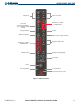
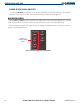
When the
MKR/MUTE
Key is selected, the annunciator light illuminates and the audio signal can be heard
over the speaker or headsets during marker beacon reception.
Figure 4-5 Marker Beacon Keys
When the
MKR/MUTE
Key is annunciated and a Marker Beacon Tone is received, pressing the
MKR/MUTE
Key mutes the audio but does not affect the annunciators. The audio returns when the next marker beacon
signal is received. If the
MKR/MUTE
Key is pressed during signal reception, while Marker Beacon Audio is
muted, Marker Beacon Audio and the
MKR/MUTE
Key Annunciator light are turned off.