
User Guide



Garmin G1000 Pilot’s Guide for the Columbia 350/400
190-00552-00 Rev. A4-2
AUDIO PANEL AND CNS
TRANSCEIVERS
NOTE: A push-to-talk (PTT) Key must be pressed to transmit on the selected radio.
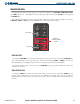
The Audio Panel handles two separate transceivers:
•
COM1 MIC
•
COM2 MIC
MONO/STEREO HEADSETS
Stereo headsets are recommended for use in this aircraft.
Using a monaural headset in a stereo jack shorts the right headset channel output to ground. While this does
not damage the Audio Panel, a person listening on a monaural headset hears only the left channel in both ears.
If a monaural headset is used at one of the passenger positions, any other passenger using a stereo headset hears
audio in the left ear only, unless their headset has a mono/stereo switch that is set to mono.
UNMUTED/UNSWITCHED INPUTS
The Audio Panel provides four unmuted/unswitched inputs that are always present on the headsets or speaker.
These inputs are the following aural warnings:
• ALTITUDE WARNING
• UNSWITCHED 1
• UNSWITCHED 2
• UNSWITCHED 3
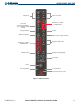
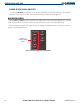
AUDIO PANEL CONTROLS
• Transceiver audio selector keys
(COM1, COM2)
• Split COM Key (Not recommended for use
in Columbia 350/400 aircraft)
(COM 1/2)
• Transmitter (audio/mic) selection keys
(COM1 MIC, COM2 MIC)
• Passenger Address Key
(PA)
• Speaker Key
(SPKR)
• Marker Beacon Receiver Audio Select/Mute Key
(MKR/MUTE)
• Marker Beacon Receiver High Sensitivity Key
(HI SENS)
• Aircraft radio audio selector keys
(NAV1, NAV2, ADF, DME, AUX)
• Intercom Manual Squelch Key
(MAN SQ)
• Digital Recording Playback Key
(PLAY)
• Intercom system (ICS) isolation key
(PILOT COPLT)
• Volume/Squelch Knob
(ICS)
• Reversionary Mode Button
(DISPLAY BACKUP)